
Website speed is a crucial factor in determining a website’s overall performance and user experience. In the digital age, where every second counts, having a fast-loading site can significantly impact your SEO rankings and user satisfaction. In this article, we’ll delve into why site speed matters for SEO, how it affects user behavior, and practical tips to enhance your website’s performance.
Why Site Speed Matters for SEO?
Site speed plays a pivotal role in SEO as it affects both the user experience and the overall effectiveness of a website. A fast-loading website provides a smooth and seamless experience for users, which can directly impact search engine rankings. According to Google’s research, users expect websites to load within 2-3 seconds, and anything longer can lead to increased bounce rates and reduced user engagement.
In terms of SEO, search engines like Google use site speed as a ranking factor. Faster websites are favored over slower ones because they provide a better user experience. A slow website can negatively affect your search engine rankings, leading to less visibility and lower organic traffic. Therefore, optimizing your site’s speed is crucial for maintaining a competitive edge in the search results.
How Site Speed Affects User Experience?
user experience is closely tied to site speed. A website that takes too long to load can frustrate users and lead to higher bounce rates. When users encounter a slow site, they are likely to leave before the page fully loads, resulting in lost opportunities for engagement, conversions, and customer satisfaction.
In addition to affecting bounce rates, site speed impacts how users interact with your content. Faster sites tend to have higher user engagement rates, as visitors are more likely to explore multiple pages and spend more time on the site. This increased engagement can lead to more conversions, whether it’s making a purchase, signing up for a newsletter, or filling out a contact form.
Google’s Perspective on Site Speed
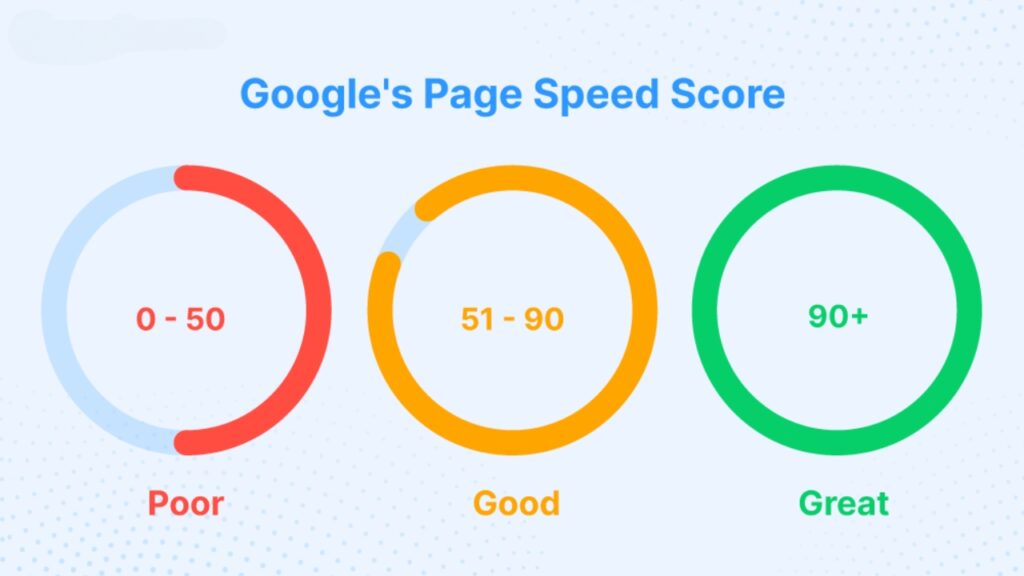
Google has been transparent about the importance of site speed in its ranking algorithms. The search engine giant has made it clear that site speed is a critical factor in determining search rankings. Google’s PageSpeed Insights tool, for example, provides valuable insights into how well a website performs and offers recommendations for improvement.
In addition to affecting desktop search rankings, site speed is also crucial for mobile search. With the growing use of mobile devices to access the web, Google has shifted towards a mobile-first indexing approach. This means that the mobile version of your website is prioritized for indexing and ranking. A slow-loading mobile site can negatively impact your search engine rankings and user experience on mobile devices.
The Connection Between Site Speed and Bounce Rate
There is a strong correlation between site speed and bounce rate. Bounce rate refers to the percentage of visitors who leave your site after viewing only one page. A high bounce rate often indicates that users are not finding what they’re looking for or are frustrated with the site’s performance.
Site speed is a significant factor in bounce rate. Studies have shown that even a one-second delay in page load time can increase bounce rates by 7%. This means that if your website is slow to load, users are more likely to leave before they have a chance to engage with your content. Reducing site speed can help lower bounce rates and keep users on your site longer, improving overall engagement and conversion rates.
Key Metrics to Measure Site Speed
To effectively improve your site’s speed, it’s essential to understand the key metrics that measure performance. Here are some of the most important metrics to track:
- Page Load Time: The total time it takes for a page to load completely. This includes all elements, such as images, scripts, and CSS files.
- Time to First Byte (TTFB): The time it takes for the browser to receive the first byte of data from the server after a request is made.
- First Contentful Paint (FCP): The time it takes for the first piece of content (text or image) to appear on the screen.
- Largest Contentful Paint (LCP): The time it takes for the largest content element (image or block of text) to be rendered on the screen.
- Cumulative Layout Shift (CLS): The amount of unexpected layout shifts that occur during the page load.
Monitoring these metrics will help you identify performance issues and areas for improvement.
Also Read: SEO for E-Commerce: How to Drive More Traffic and Sales to Your Online Store?
Tools to Analyze Your Site’s Speed
Several tools can help you analyze and optimize your site’s speed. Here are some popular ones:
- Google PageSpeed Insights: Provides a detailed analysis of your site’s performance and offers recommendations for improvement.
- GTmetrix: Offers insights into page load times and provides actionable recommendations to enhance performance.
- Pingdom: Monitors site speed from multiple locations and provides detailed performance reports.
- WebPageTest: Allows you to test your site’s speed from different locations and browsers, providing a comprehensive view of performance.
Using these tools will help you understand your site’s performance and identify specific areas that need improvement.
Top Strategies to Improve Your Site Speed
Improving site speed involves various strategies and techniques. Here are some effective ways to enhance your website’s performance:
Optimize Images
Large image files can significantly slow down your site. Compressing images without sacrificing quality can help reduce load times. Tools like TinyPNG and ImageOptim can help you compress images efficiently.
Leverage Browser Caching
Browser caching allows your website to store certain elements in a visitor’s browser, so they don’t need to be reloaded every time they visit your site. This can significantly reduce load times for returning visitors.
Minimize HTTP Requests
Each element on a web page (images, scripts, and stylesheets) requires an HTTP request. Reducing the number of these requests by combining files and using CSS templates can help speed up your site.
Implement Content Delivery Networks (CDNs)
CDNs distribute your website’s content across multiple servers around the world, allowing users to access your site from a server closer to their location. This can help reduce latency and improve load times.
Common Site Speed Issues and How to Fix Them
Some common issues that can affect site speed include:
- Unoptimized Images: Use image compression tools to reduce file sizes.
- Excessive JavaScript and CSS: Minify and combine files to reduce the number of requests.
- Slow Server Response Times: Consider upgrading your hosting plan or using a CDN to improve server response times.
- Too Many Plugins: Disable or remove unnecessary plugins to reduce the load on your site.
Addressing these issues can help improve your site’s speed and overall performance.
Measuring the Impact of Speed Improvements
After implementing speed optimization strategies, it’s essential to measure their impact. Use tools like Google PageSpeed Insights and GTmetrix to track improvements in load times and performance metrics. Comparing pre- and post-optimization data will help you gauge the effectiveness of your changes and identify any remaining issues.
Future Trends in Site Speed Optimization
As technology continues to evolve, new trends in site speed optimization are emerging. Some future trends to watch for include:
- AI and Machine Learning: Advanced algorithms that can optimize site performance in real-time.
- WebAssembly: A technology that allows high-performance code to run on the web, potentially speeding up complex tasks.
- Edge Computing: Processing data closer to the user to reduce latency and improve performance.
Staying up-to-date with these trends will help you maintain a fast and competitive website.
Must Read: Mastering SEO: 10 Expert Tips to Boost Your Website Traffic in 2024
FAQs
Why is site speed important for SEO?
Site speed is important for SEO because search engines like Google use it as a ranking factor. Faster sites provide a better user experience and are more likely to rank higher in search results.
How can I measure my site’s speed?
You can measure your site’s speed using tools like Google PageSpeed Insights, GTmetrix, Pingdom, and WebPageTest.
What are some common site speed issues?
Common site speed issues include unoptimized images, excessive JavaScript and CSS, slow server response times, and too many plugins.
How can I improve my site’s speed?
To improve your site’s speed, you can optimize images, leverage browser caching, minimize HTTP requests, and implement a Content Delivery Network (CDN).
What are some future trends in site speed optimization?
Future trends include the use of AI and machine learning for real-time optimization, WebAssembly for high-performance tasks, and edge computing to reduce latency.

